Deploying Laravel with Inertia SSR, Bun, Horizon, Reverb, Supervisor, and Correct File Permissions

Deploying Laravel with Inertia SSR means running pnpm run build:ssr to create both the frontend assets and the Vue/React server-rendering bundle. Laravel then starts a Node.js or Bun-powered SSR server, which renders each Inertia page on the server and returns the generated HTML to Laravel. The browser receives ready-to-display content and then hydrates it with JavaScript, providing faster initial rendering and improved SEO for public pages.
In this guide, we’ll deploy a Laravel 13 application with Inertia.js server-side rendering powered by Bun. We’ll configure Horizon for Redis queues, Reverb for WebSockets, and Supervisor to keep each background service
running reliably. We’ll also install the required Node.js and pnpm versions, configure shared Bun access for multiple projects, fix common file-permission and ownership problems, build the production SSR bundle, restart
long-running processes safely, and verify that the complete deployment is working correctly.
Application
- Laravel: 13.17
- Laravel Horizon (optional queue monitoring and management)
- Reverb (optional)
- Queues
- Inertia.js 3 with Vue 3 (Vue starter-kit)
- Vite 8
- Nodejs: v24.19.0
- Bunjs: 1.4.0 (production Inertia SSR runtime, you can use Nodejs as well)
- VITE+
vp v0.3.3(optional) - NPM: 12.0.2
- PNPM: 10.33.0
- PHP: PHP 8.4.23 FPM
- Cache: Redis + OPcache
- Database: MySQL (I like it because of multi threaded architecture)
- VPS: Hetzner 2 vCPU + 4GB RAM + 2GB SWAP RAM
- Nginx
- Supervisor — manages Horizon, Reverb, and Inertia SSR
- SSL/TLS certificate
If you were already ran composer install and pnpm install using root then do first
Delete vendor and node_modules first, because we need to install these via application username such as www-data or with application-user
cd /home/domain/public_html

sudo rm -Rf node_modules
sudo rm -Rf vendor
Now create SSR related folders and assign permission:
Replace application-user with the Linux user that owns your website files and runs Laravel’s Composer, pnpm, Horizon, Reverb, and SSR processes. Hosting panels such as Virtualmin or Plesk often create this user when the
domain is added. This is usually different from the Nginx/PHP-FPM user, such as www-data or application-user
Replace example-user or application-user below with the returned username and group. Only remove vendor and node_modules when repairing an installation previously created by root:
cd /home/domain/public_html

stat -c '%U:%G' .
# output --> www-data:www-data
# output --> hassam:hassam
# output --> root:root
# output --> application-user:application-user

cd /home/domain/public_html

sudo mkdir -p public/build bootstrap/ssr
sudo chown -R application-user:application-user \
	/public/build \
	/bootstrap/ssr

sudo chown -R application-user:application-user \
  /storage \
  /bootstrap/cache \
  /public/build \
  /bootstrap/ssr

sudo chmod -R ug+rwX \
  /storage \
  /bootstrap/cache
Quick steps to save time if you are experienced, if not then skip and follow other steps:
make sure you’re not
roothere, mostly www-datasu - www-data
su - application-user
 OR
su - www-data

cd /home/domain/public_html

git pull --ff-only
composer install --no-dev --prefer-dist --optimize-autoloader --no-interaction
pnpm install --frozen-lockfile
pnpm run build:ssr
php artisan migrate --force
php artisan optimize:clear
php artisan optimize
Supervisor Auto Registration
Use this preferred path to register Horizon, Reverb, and Inertia SSR together. The repo Supervisor files are templates; server-specific values live in supervisor/.env. Do not hardcode the server user, group, application path, log path, PHP binary, or process PATH in supervisor/*.conf; the installer renders those values from supervisor/.env.
I provided the Supervior Zip folder below, you can download it and paste it in your Laravel application at root directory, then modify install-supervisor.sh, or other supervisor/workers files as per your need and we just hit sudo bash supervisor/install-supervisor.sh and it’ll install supervisor in your Linux server if missing then it’ll register all configuraton files such as queues, horizon, reverb from supervisor folder.
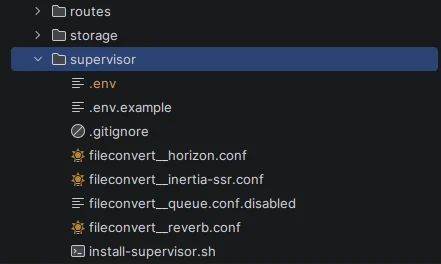
run sudo bash supervisor/install-supervisor.sh
root@host:/home/domain/public_html# sudo bash supervisor/install-supervisor.sh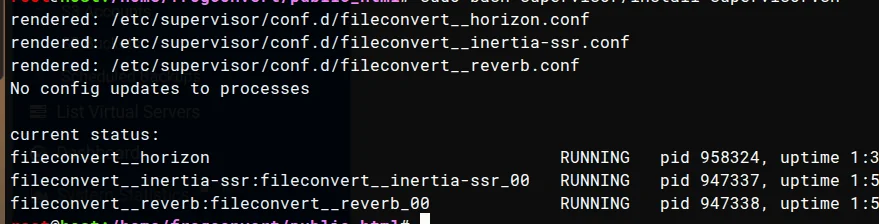
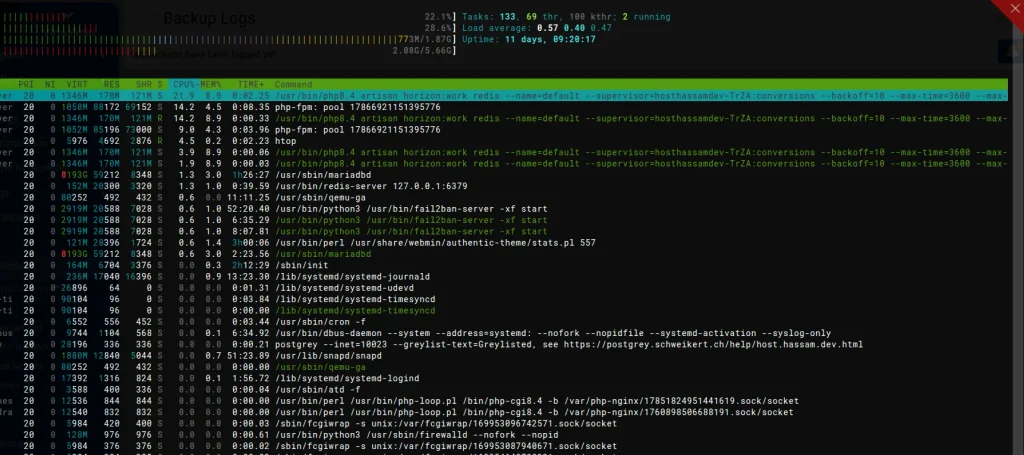
htop shell command. below screenshot was captured once you done all the steps and start to convert files.
- # inside supervisor folder e.g
var/www/html/laraapp/supervisor/ - .env
- .env-example
- install-supervisor.sh
- fileconvert__horizon.conf
- fileconvert__inertia-ssr.conf
- fileconvert__queue.conf.disabled
- pdf-stats-generate__queue.conf
- user-invitation-email__queue.conf
- fileconvert__reverb.conf
APP_DIR=/home/domain/public_html
# APP_USER=www-data
APP_USER=application-user
APP_GROUP=application-user
LOG_DIR=/var/www/command_log_fileconverter
PHP_BIN=php

# Install Bun as APP_USER so Supervisor can execute that user's Bun installation.
PROCESS_PATH=/home/application-user/.bun/bin:/usr/local/bin:/usr/bin:/bin

# BUT if you have vite-plus (by void0) and viteplus is manage nodejs or bunjs then
## which bun
## /home/application-user/.local/share/vite-plus/bin/bun
PROCESS_PATH=/home/application-user/.local/share/vite-plus/bin:/usr/local/bin:/usr/bin:/bin
#!/usr/bin/env bash
#
# install-supervisor.sh — sync this repo's supervisor programs onto a Debian server.
#
# Renders every *.conf template in this folder into /etc/supervisor/conf.d/, then
# reloads supervisor so changes take effect. Idempotent: safe to run repeatedly.
# The committed templates use placeholders so server-specific paths/users never
# need to be committed.
#
# Usage (on the server):
#   cp supervisor/.env.example supervisor/.env
#   nano supervisor/.env
#   sudo bash supervisor/install-supervisor.sh
#
set -euo pipefail

# --- must be root (supervisor config + reload need it) ------------------------
if [[ "${EUID}" -ne 0 ]]; then
  echo "ERROR: run as root — sudo bash $0" >&2
  exit 1
fi

# --- resolve paths ------------------------------------------------------------
# SRC_DIR = this repo's supervisor/ folder (where this script lives), resolved absolute.
SRC_DIR="$(cd "$(dirname "$(readlink -f "$0")")" && pwd)"
APP_DIR="$(cd "$SRC_DIR/.." && pwd)"
CONF_D="/etc/supervisor/conf.d"
LOG_DIR="/var/www/command_log_fileconverter"
APP_USER="$(stat -c '%U' "$APP_DIR")"
APP_GROUP="$APP_USER"
PHP_BIN="php"
PROCESS_PATH=""

if [[ -f "$SRC_DIR/.env" ]]; then
  # shellcheck disable=SC1091
  source "$SRC_DIR/.env"
fi

APP_DIR="${APP_DIR%/}"
LOG_DIR="${LOG_DIR%/}"
APP_HOME="$(getent passwd "$APP_USER" | cut -d: -f6)"

if [[ -z "$APP_HOME" ]]; then
  echo "ERROR: could not resolve the home directory for APP_USER=$APP_USER." >&2
  exit 1
fi

PROCESS_PATH="${PROCESS_PATH:-$APP_HOME/.bun/bin:/usr/local/bin:/usr/bin:/bin}"

# --- preflight ----------------------------------------------------------------
if ! command -v supervisorctl >/dev/null 2>&1; then
  echo "ERROR: supervisor not installed. Install it first:" >&2
  echo "  sudo apt-get update && sudo apt-get install -y supervisor" >&2
  exit 1
fi

if ! PATH="$PROCESS_PATH" command -v bun >/dev/null 2>&1; then
  echo "ERROR: Bun is not available in PROCESS_PATH for Inertia SSR:" >&2
  echo "  $PROCESS_PATH" >&2
  echo "Install Bun as $APP_USER with the official installer or set PROCESS_PATH in supervisor/.env." >&2
  exit 1
fi

mkdir -p "$CONF_D"

# Log dir the rendered .conf files write into — create it so workers don't fail on start.
mkdir -p "$LOG_DIR"
chown "$APP_USER:$APP_GROUP" "$LOG_DIR" 2>/dev/null || true

# --- render every program file -----------------------------------------------
shopt -s nullglob
conf_files=("$SRC_DIR"/*.conf)
if [[ ${#conf_files[@]} -eq 0 ]]; then
  echo "ERROR: no *.conf files found in $SRC_DIR" >&2
  exit 1
fi

for conf in "${conf_files[@]}"; do
  name="$(basename "$conf")"
  rendered="$CONF_D/$name"
  sed \
    -e "s#__APP_DIR__#$APP_DIR#g" \
    -e "s#__APP_USER__#$APP_USER#g" \
    -e "s#__LOG_DIR__#$LOG_DIR#g" \
    -e "s#__PHP_BIN__#$PHP_BIN#g" \
    -e "s#__PROCESS_PATH__#$PROCESS_PATH#g" \
    "$conf" > "$rendered"
  echo "rendered: $rendered"
done

# --- prune stale links from the older symlink installer -----------------------
for link in "$CONF_D"/*.conf; do
  [[ -L "$link" ]] || continue
  target="$(readlink -f "$link" || true)"
  case "$(readlink "$link")" in
    "$SRC_DIR"/*)
      if [[ ! -e "$target" ]]; then
        rm -f "$link"
        echo "pruned stale: $link (target gone)"
      fi
      ;;
  esac
done

# --- reload supervisor --------------------------------------------------------
# reread : re-read config files from disk
# update : start new programs, restart programs whose config changed, remove deleted ones
supervisorctl reread
supervisorctl update

echo
echo "current status:"
supervisorctl status
# ============================================================================
# Laravel Horizon — default queue worker process for Redis queues.
#
# install-supervisor.sh deploys this file because it ends in `.conf`.
# Do not also enable fileconvert__queue.conf.disabled for the same queues.
# Horizon spawns and manages the queue workers via config/horizon.php.
#
# Horizon replaces ALL queue:work programs (image/audio/video). Reverb stays
# its own program (fileconvert__reverb.conf) — Horizon does not manage websockets.
# ============================================================================
[program:fileconvert__horizon]
process_name=%(program_name)s
directory=__APP_DIR__
command=__PHP_BIN__ __APP_DIR__/artisan horizon
autostart=true
autorestart=true
user=__APP_USER__
umask=0007
; Horizon traps SIGTERM and drains in-flight jobs before exiting — give it room
; so a deploy/restart never kills a job mid-convert. Must exceed the longest job.
stopsignal=SIGTERM
stopwaitsecs=3600
redirect_stderr=true
stderr_logfile=__LOG_DIR__/horizon.log
stdout_logfile=__LOG_DIR__/horizon.log
[program:fileconvert__inertia-ssr]
process_name=%(program_name)s_%(process_num)02d
directory=__APP_DIR__
; Inertia SSR is a single local HTTP renderer used by Laravel at 127.0.0.1:13714.
; Build bootstrap/ssr/app.js before starting/restarting this process.
; The runtime comes from INERTIA_SSR_RUNTIME=bun; PROCESS_PATH must include Bun.
command=__PHP_BIN__ __APP_DIR__/artisan inertia:start-ssr
user=__APP_USER__
autostart=true
autorestart=true
numprocs=1
stopasgroup=true
killasgroup=true
stopwaitsecs=10
redirect_stderr=true
stderr_logfile=__LOG_DIR__/inertia-ssr.log
stdout_logfile=__LOG_DIR__/inertia-ssr.log
environment=PATH="__PROCESS_PATH__"
[program:fileconvert__reverb]
process_name=%(program_name)s_%(process_num)02d
directory=__APP_DIR__
command=__PHP_BIN__ __APP_DIR__/artisan reverb:start --host=0.0.0.0 --port=8080
; if `--port=8080` is already in used by other application then use 8081 same for nginx conf
user=__APP_USER__
autostart=true
autorestart=true
; Reverb is a single long-running websocket server — run exactly ONE process.
numprocs=1
; Give in-flight connections time to drain on restart/deploy.
stopwaitsecs=10
redirect_stderr=true
stderr_logfile=__LOG_DIR__/reverb.log
stdout_logfile=__LOG_DIR__/reverb.log
Queue process choice:
- Default: use Horizon for Redis queues with
supervisor/fileconvert__horizon.conf. - Keep
supervisor/fileconvert__queue.conf.disableddisabled unless you intentionally roll back to plainqueue:work. - Do not run Horizon and
queue:workfor the same queues at the same time. Jobs can be processed twice. - Horizon manages Laravel queue workers only. Reverb and Inertia SSR remain separate Supervisor programs.
(optional) If old Supervisor files exist from the manual setup, remove them once before registering the new prefixed files:
ls /etc/supervisor/conf.d

rm -f /etc/supervisor/conf.d/image-file-converter-inertia-ssr.conf
rm -f /etc/supervisor/conf.d/image-file-converter-queue.conf
rm -f /etc/supervisor/conf.d/image-file-converter-reverb.conf
rm -f /etc/supervisor/conf.d/fileconvert__queue.conf
supervisorctl reread
supervisorctl update

# if you still see older files then
ls /etc/supervisor/conf.d
sudo systemctl restart supervisor
Create the per-server config:
cd /home/domain/public_html
cp supervisor/.env.example supervisor/.env
nano supervisor/.env
I added supervisor folder ZIP, so download it. this folder contains:
hassam@machine-tp:/var/www/html/laravel-file-converter/supervisor$ ll
total 40
drwxrwxr-x  2 hassam hassam 4096 Aug 26 03:29 ./
drwxrwxr-x 24 hassam hassam 4096 Aug 26 03:19 ../
-rw-rw-r--  1 hassam hassam  195 Aug 26 03:22 .env
-rw-rw-r--  1 hassam hassam  449 Aug 26 01:16 .env.example
-rw-rw-r--  1 hassam hassam 1090 Aug 21 19:11 fileconvert__horizon.conf
-rw-rw-r--  1 hassam hassam  650 Aug 26 01:09 fileconvert__inertia-ssr.conf
-rw-rw-r--  1 hassam hassam 1375 Aug 21 19:11 fileconvert__queue.conf.disabled
-rw-rw-r--  1 hassam hassam  496 Aug 21 17:55 fileconvert__reverb.conf
-rw-rw-r--  1 hassam hassam    5 Aug 21 17:44 .gitignore
-rwxrwxr-x  1 hassam hassam 3579 Aug 26 01:16 install-supervisor.sh*
hassam@machine-tp:/var/www/html/laravel-file-converter/supervisor$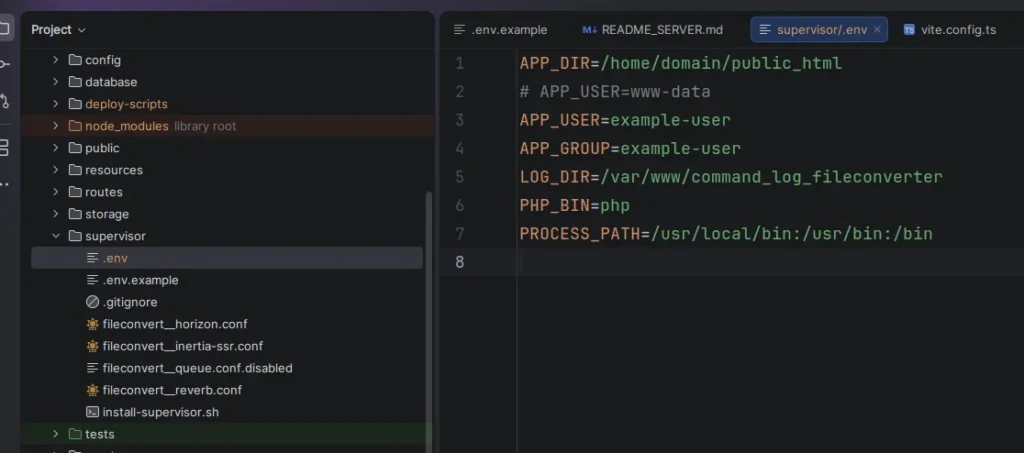
Paste below code in /supervisor/.env using nano .supervisor/.env
# APP_DIR=/var/www/domain/public_html
APP_DIR=/home/domain/public_html
APP_USER=application-user
APP_GROUP=application-user
LOG_DIR=/var/www/command_log_fileconverter
PHP_BIN=php
Laravel is configured to run the production Inertia SSR bundle with Bun-v1.4.0. Keep this value in the server .env:
by defauly Inertis uses NodeJS. if you want to go with NodeJS then dont add any key in .env
INERTIA_SSR_RUNTIME=bunHow to set Inertia SSR Runtime to Bun or Node
|
Bun |
|---|
|
|
Node |
|---|
|
For a server hosting multiple projects, install Bun once into /usr/local so every non-root Supervisor application user can use the same executable. The Bun installer honors BUN_INSTALL, and this places the executable at /usr/local/bin/bun:
curl -fsSL https://bun.com/install | sudo env BUN_INSTALL=/usr/local bash
sudo -u application-user -H env PATH="/usr/local/bin:/usr/bin:/bin" bun --version
php artisan config:show inertia.ssr.runtime
If which bun as root returns /root/.bun/bin/bun, that is root’s private Bun installation, not a global installation. Do not point a non-root Supervisor process into /root. The private installation may remain, but Supervisor uses the shared /usr/local/bin/bun. Local development may continue using a user-local installation such as /home/hassam/.bun/bin/bun.
VITE+ – The Unified Toolchain for the Web [Node and Bun]
if you are using VITE+ to manage nodejs or bunjs then run below commands vp env doctor for verify the paths:
vp env doctor


VITE+ - The Unified Toolchain for the Web

Installation
  ✓ Bin dir           ~/.local/share/vite-plus/bin
  ✓ Data dir          ~/.local/share/vite-plus
  ✓ Cache dir         ~/.cache/vite-plus
  ✓ Config dir        ~/.config/vite-plus
  ✓ State dir         ~/.local/state/vite-plus
  ✓ Shims             node, npm, npx, pnpm, pnpx, yarn, yarnpkg, bun, bunx, vpx, vpr

Configuration
  ✓ Node.js           managed mode
  ✓ Package manager   managed mode
  ✓ IDE integration   env sourced in ~/.profile

PATH
  ✓ vp                ~/.local/share/vite-plus/bin/vp
  ✓ Shim dir          ~/.local/share/vite-plus/bin
  ✓ node              ~/.local/share/vite-plus/bin/node (vp shim)
  ✓ npm               ~/.local/share/vite-plus/bin/npm (vp shim)
  ✓ npx               ~/.local/share/vite-plus/bin/npx (vp shim)
  ✓ pnpm              ~/.local/share/vite-plus/bin/pnpm (vp shim)
  ✓ pnpx              ~/.local/share/vite-plus/bin/pnpx (vp shim)
  ✓ yarn              ~/.local/share/vite-plus/bin/yarn (vp shim)
  ✓ yarnpkg           ~/.local/share/vite-plus/bin/yarnpkg (vp shim)
  ✓ bun               ~/.local/share/vite-plus/bin/bun (vp shim)
  ✓ bunx              ~/.local/share/vite-plus/bin/bunx (vp shim)
  ✓ vpx               ~/.local/share/vite-plus/bin/vpx (vp shim)
  ✓ vpr               ~/.local/share/vite-plus/bin/vpr (vp shim)

Node.js Resolution
    Directory         /home/application-user
    Source            lts
    Version           24.21.0
  ✓ Node binary       installed

Package Manager Resolution
    Package manager   not selected

✓ All checks passed
Render and register all Supervisor programs automatically:
sudo bash supervisor/install-supervisor.sh
sudo supervisorctl status

php artisan horizon:status
php artisan inertia:check-ssr

# if you chnage anything in config horizon.php the
php artisan optimize:clear
php artisan horizon:terminate # supervior will auto restart it

# Expected default programs:
# - fileconvert__horizon
# - fileconvert__inertia-ssr
# - fileconvert__reverb
Check the Bun SSR process
ps -eo pid,ppid,user,%cpu,%mem,rss,cmd | grep -E 'inertia|bun|ssr' | grep -v grep

# keep numprocs=1
grep -n "numprocs" /etc/supervisor/conf.d/fileconvert__inertia-ssr.conf
Horizon Queue Setup
This project uses Redis first, so Horizon is the default queue manager.
Current Horizon pieces:
laravel/horizonis installed.config/horizon.phpdefines the queue workers.supervisor/fileconvert__horizon.confrunsphp artisan horizon.supervisor/fileconvert__queue.conf.disabledis disabled because Horizon replaces directqueue:workprocesses.
Server .env should use Redis queues and Redis for cache/session:
# Queue
QUEUE_CONNECTION=redis

# Cache & Session (critical for performance - switch from database)
CACHE_STORE=redis
SESSION_DRIVER=redis

REDIS_CLIENT=phpredis
REDIS_HOST=127.0.0.1
REDIS_PASSWORD=null
REDIS_PORT=6379
REDIS_DB=0
REDIS_CACHE_DB=1

REDIS_QUEUE_CONNECTION=default
REDIS_QUEUE_RETRY_AFTER=360
Note: Default config uses
databasefor cache/session/queue. Switching to Redis eliminates DB round-trips for every request and queue job — the single highest-impact change.
Keep REDIS_QUEUE_RETRY_AFTER greater than the Horizon worker timeout. The current conversion timeout is 300 seconds, so 360 is the minimum safe value. Horizon currently listens only to the active image conversion queue:
image-file-converter-queueAudio and video queues are already named in the codebase, but they are commented in config/horizon.php until those converters are enabled.
Horizon Production Scaling
Edit config/horizon.php for your server CPU cores (Hetzner CPX examples):
'defaults' => [
    'conversions' => [
        'connection' => 'redis',
        'queue' => [
            'image-file-converter-queue',
            // 'audio-file-converter-queue',
            // 'video-file-converter-queue',
        ],
        'balance' => 'auto',
        'autoScalingStrategy' => 'time',
        'minProcesses' => 1,                    // Always keep warm workers
        'maxProcesses' => 3,                    // Match CPU cores (CPX41=8, CPX31=4)
        'balanceMaxShift' => 1,
        'balanceCooldown' => 3,
        'maxTime' => 3600,
        'maxJobs' => 500,
        'memory' => 512,                        // Increase for imagemagic/sharp large images
        'tries' => 3,
        'timeout' => 300,
        'backoff' => 10,
        'nice' => 0,
    ],
],

'environments' => [
    'production' => [
        'conversions' => [
            'maxProcesses' => 8,                // Override for production
        ],
    ],
    // ...
],

// Enable for zero-downtime deploys
'fast_termination' => true,
After changes:
php artisan optimize:clear
php artisan horizon:terminate  # Supervisor restarts automatically
# The production deployment model is:
Supervisor -> fileconvert__horizon -> php artisan horizon -> Laravel queue workers
Supervisor -> fileconvert__reverb -> php artisan reverb:start
Supervisor -> fileconvert__inertia-ssr -> php artisan inertia:start-ssrHorizon does not start, stop, scale, or monitor Reverb or Inertia SSR.
Node and pnpm for production builds
Node and pnpm are only used to build the frontend bundles. The production Inertia SSR process still runs with the shared /usr/local/bin/bun through Supervisor, so NVM does not belong in the Supervisor process PATH.
Log in as the application user configured by APP_USER in supervisor/.env,
then install NVM, the project Node version, and pnpm for that user:
curl -o- https://raw.githubusercontent.com/nvm-sh/nvm/v0.40.6/install.sh | bash

export NVM_DIR="$HOME/.nvm"
[ -s "$NVM_DIR/nvm.sh" ] && . "$NVM_DIR/nvm.sh"

nvm install 24.18.0
nvm alias default 24.18.0
nvm use 24.18.0
npm install --global [email protected]

node --version
which node
pnpm --version
If installation reports group block limit reached, clear incomplete and unused download caches, then inspect the account quota before retrying:
nvm cache clear
pnpm store prune
composer clear-cache

df -h "$HOME"
df -i "$HOME"
quota -s
du -xhd1 "$HOME" | sort -h
Increase the account/group quota or remove confirmed unneeded files if the quota remains at its limit. Do not delete the active public/build directory until a replacement build is ready.
Use this deploy flow after Horizon is enabled:
Run Git, Composer, pnpm, and Artisan as the application user. Before building, ensure that generated frontend directories belong to that user. This repairs files left behind if an earlier deployment was run as root; do not usechmod 777.
cd /home/domain/public_html
source supervisor/.env

git pull --ff-only
composer install --no-dev --prefer-dist --optimize-autoloader --no-interaction
pnpm install --frozen-lockfile

# run as ROOT
sudo mkdir -p "$APP_DIR/public/build" "$APP_DIR/bootstrap/ssr"
sudo chown -R "$APP_USER:$APP_GROUP" \
    "$APP_DIR/public/build" \
    "$APP_DIR/bootstrap/ssr"

# run as application USERNAME such as `www-data` or `application-user`
pnpm run build:ssr
php artisan migrate --force
php artisan optimize:clear
php artisan horizon:terminate
php artisan inertia:stop-ssr

# run as ROOT
sudo bash supervisor/install-supervisor.sh
sudo systemctl reload php8.4-fpm
sudo supervisorctl status

# run as application USERNAME suuch as `www-data` or `application-user`
php artisan horizon:status
php artisan inertia:check-ssr
php artisan horizon:terminate lets active jobs finish, exits Horizon, and lets Supervisor restart it with the new code.
Before switching or after deploy, verify:
# run as application USERNAME suuch as www-data

php artisan config:show queue.default
php artisan config:show queue.connections.redis.retry_after
php artisan config:show horizon.defaults
php artisan config:show horizon.allowed_email
php artisan horizon:status
redis-cli ping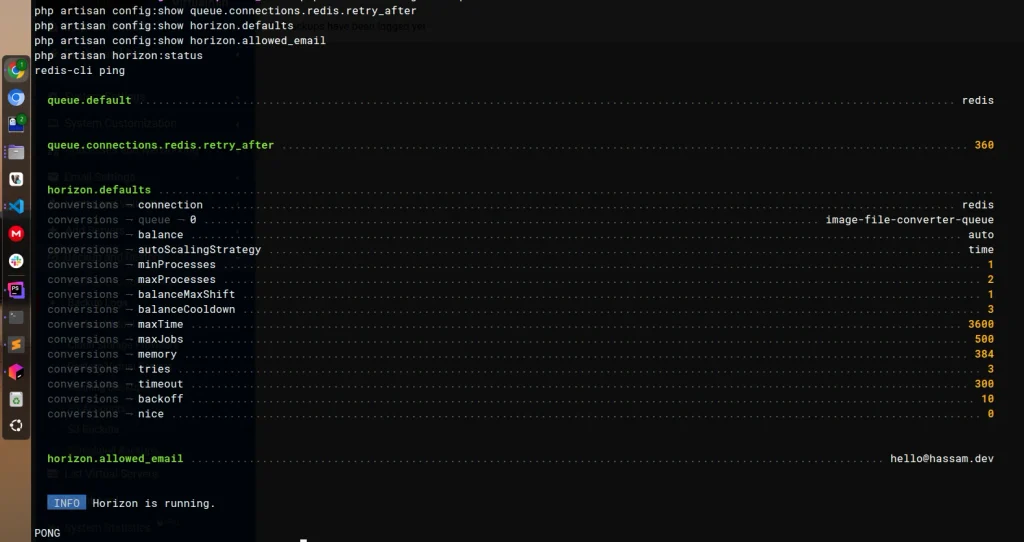
If /horizon returns 401 | Forbidden while /dashboard works, verify that the logged-in user email exactly matches SYSTEM_ADMIN_USER_MAIL= after config is cleared:
# run as application USERNAME suuch as `www-data` or `application-user`

php artisan optimize:clear
php artisan config:show horizon.allowed_email
Horizon dashboard: https://hassam.dev/horizon
In production, dashboard access is controlled by viewHorizon in app/Providers/HorizonServiceProvider.php. Only the authenticated user matching SYSTEM_ADMIN_USER_MAIL can access it.
If you dont want Horizon then – Roll Back to Plain Queue Worker
If you dont want to controll Queues using horizon then we can simply create supervisor for our Queue job
Only use this fallback if Horizon has to be disabled:
mv supervisor/fileconvert__horizon.conf supervisor/fileconvert__horizon.conf.disabled
mv supervisor/fileconvert__queue.conf.disabled supervisor/fileconvert__queue.conf

php artisan optimize:clear

sudo rm -f /etc/supervisor/conf.d/fileconvert__horizon.conf
sudo bash supervisor/install-supervisor.sh
sudo supervisorctl status
Queue Worker Sample – Plain Laravel queue worker
sudo nano /etc/supervisor/conf.d/fileconvert__queue.conf[program:fileconvert__queue]
process_name=%(program_name)s_%(process_num)02d
; --timeout=300 matches ProcessImageConversionJob (never leave it at 0 = stuck job runs forever)
; --memory/--max-jobs/--max-time recycle the worker so libvips leaks/fragmentation can't grow unbounded
directory=__APP_DIR__
command=__PHP_BIN__ __APP_DIR__/artisan queue:work --queue=image-file-converter-queue --tries=3 --backoff=10 --timeout=300 --memory=384 --max-jobs=500 --max-time=3600 --sleep=3 --rest=0.2
user=__APP_USER__
autostart=true
autorestart=true
; 2 cores = 2 images in parallel, max. More workers just thrash + multiply RAM spikes.
numprocs=2
; > --timeout so a running job finishes on restart/deploy instead of being killed mid-convert.
stopwaitsecs=310
redirect_stderr=true
stderr_logfile=__LOG_DIR__/image-file-converter-queue.log
stdout_logfile=__LOG_DIR__/image-file-converter-queue.logsupervisorctl reread
supervisorctl update
supervisorctl start fileconvert__reverb:*
supervisorctl statusManual Supervisor setup is also documented below for fallback/debugging.
Need to manually create Supervior files for queues, just copy code inside /supervisor/fileconvert_queue.conf. create supervisor/worker files as per the queues you have. [but make sure you’ve CPU enough CORS otherwise create few workers].
su - sample-user

cd /home/domain/public_html

git pull --ff-only
composer install --no-dev --prefer-dist --optimize-autoloader --no-interaction
pnpm install --frozen-lockfile
pnpm run build:ssr
php artisan migrate --force
php artisan optimize:clear
php artisan optimize
OPcache Production Configuration
Apply to /etc/php/8.4/fpm/conf.d/10-opcache.ini:
; configuration for php opcache module
; priority=10
;zend_extension=opcache.so
;opcache.jit=off
; ai
; OPcache Production Configuration for Laravel File Converter (fileconvert)
; priority=10
zend_extension=opcache.so

; Enable OPcache
opcache.enable=1
opcache.enable_cli=1

; Memory allocation
opcache.memory_consumption=512
opcache.interned_strings_buffer=64
opcache.max_accelerated_files=20000
opcache.max_wasted_percentage=5
opcache.max_file_size=0

; Performance - disable timestamp validation in production
; NOTE: deploy script MUST call opcache_reset() or reload php-fpm on every
; deploy, or stale bytecode will keep being served. Same goes for restarting
; Horizon (`php artisan horizon:terminate`) and the Reverb service — those are
; separate long-running processes and OPcache freshness doesn't touch them.
opcache.validate_timestamps=0
opcache.revalidate_freq=0
opcache.file_update_protection=2

; JIT Configuration (PHP 8.1+)
; PHP 8.4 defaults JIT to "disable" precisely because it gives little/no gain
; for I/O-bound frameworks like Laravel. Keep this only if you've benchmarked
; a real win (e.g. heavy in-PHP image/data processing, not just DB/Redis calls).
; To test the counterfactual, swap the next line for: opcache.jit=disable
; User note: benchmarked and kept enabled for libvips image processing hot paths.
opcache.jit=1255
opcache.jit_buffer_size=256M

; Preload Laravel application
; Leave disabled until you've written and tested an actual preload script —
; enabling this with a bad/missing script will break FPM startup.
; opcache.preload=/home/fileconvert/public_html/bootstrap/app.php
; opcache.preload_user=fileconvert

; Optimization
opcache.optimization_level=0x7FFEBFFF
opcache.save_comments=1

; Huge code pages: disabled — provides no measurable runtime benefit on most
; systems, adds ~5ms to startup, and only does anything if the OS has
; hugepages provisioned (check /proc/meminfo for HugePages_Total). Turn back
; on only if you've confirmed hugepages exist AND benchmarked a real gain.
opcache.huge_code_pages=0

; Error handling
opcache.error_log=/var/log/php/opcache.log
opcache.log_verbosity_level=1
opcache.record_warnings=0
opcache.force_restart_timeout=180

; Lockfile
opcache.lockfile_path=/tmp
opcache.protect_memory=0
opcache.restrict_api=

; File cache — survives FPM restarts without a full cold recompile.
; Since you're already restarting FPM on every deploy (point above), this
; makes those restarts cheaper. Create the directory first:
;   mkdir -p /var/cache/php/opcache && chown fileconvert:fileconvert /var/cache/php/opcache
opcache.file_cache=/var/cache/php/opcache
opcache.file_cache_only=0
opcache.file_cache_consistency_checks=1
Then reload PHP-FPM:
sudo systemctl reload php8.4-fpm

sudo mkdir -p /var/cache/php/opcache
sudo chown fileconvert:fileconvert /var/cache/php/opcache
tail -20 /var/log/php/opcache.log
Verify:
php -i | grep opcacheNginx Conf file
server {
    listen 443 ssl;
    listen [::]:443 ssl;

    server_name example.local www.example.local;

    root /var/www/html/example.local/public;
    index index.php index.htm index.html;

    client_max_body_size 256M;

    access_log /var/log/nginx/example.local_access.log;
    error_log  /var/log/nginx/example.local_error.log;

    # Canonical host: www -> apex (important for SEO / cookies / Reverb origin)
    if ($host = www.example.local) {
        return 301 https://example.local$request_uri;
    }

    # Laravel application
    location / {
        try_files $uri $uri/ /index.php?$query_string;
    }

    # Laravel Reverb WebSocket
    location ~ ^/(app|apps)(/|$) {
        proxy_http_version 1.1;

        proxy_set_header Host $http_host;
        proxy_set_header Scheme $scheme;
        proxy_set_header SERVER_PORT $server_port;
        proxy_set_header REMOTE_ADDR $remote_addr;
        proxy_set_header X-Forwarded-For $proxy_add_x_forwarded_for;
        proxy_set_header X-Forwarded-Proto $scheme;

        proxy_set_header Upgrade $http_upgrade;
        proxy_set_header Connection "Upgrade";

        proxy_pass http://127.0.0.1:8080;

        proxy_read_timeout 86400s;
        proxy_send_timeout 86400s;
    }

    # Vite hashed assets — long cache
    location ^~ /build/ {
        expires 60d;
        add_header Cache-Control "public, max-age=5184000, immutable";
        access_log off;
        try_files $uri =404;
    }

    # Other static files
    location ~* \.(css|js|mjs|jpg|jpeg|png|gif|ico|svg|webp|avif|woff|woff2|ttf|eot|map)$ {
        expires 60d;
        add_header Cache-Control "public, max-age=5184000";
        access_log off;
        try_files $uri =404;
    }

    # ACME challenge (in case you add non-Cloudflare / non-certbot-webroot renewals later)
    location ^~ /.well-known/acme-challenge/ {
        root /var/www/html/example.local/public;
        default_type text/plain;
        try_files $uri =404;
    }

    # PHP-FPM
    location ~ ^/index\.php(/|$) {
        fastcgi_pass unix:/run/php/php8.4-fpm.sock;
        fastcgi_param SCRIPT_FILENAME $realpath_root$fastcgi_script_name;
        fastcgi_param DOCUMENT_ROOT   $realpath_root;
        fastcgi_param PATH_INFO       $fastcgi_path_info;
        include fastcgi_params;
        fastcgi_hide_header X-Powered-By;
    }

    # Deny hidden files except .well-known
    location ~ /\.(?!well-known).* {
        deny all;
    }

    ssl_certificate     /etc/letsencrypt/live/example.local/fullchain.pem;
    ssl_certificate_key /etc/letsencrypt/live/example.local/privkey.pem;
    include /etc/letsencrypt/options-ssl-nginx.conf;
    ssl_dhparam /etc/letsencrypt/ssl-dhparams.pem;
}

server {
    listen 80;
    listen [::]:80;

    server_name example.local www.example.local;

    # Allow ACME challenges over HTTP before redirecting
    location ^~ /.well-known/acme-challenge/ {
        root /var/www/html/example.local/public;
        default_type text/plain;
        try_files $uri =404;
    }

    location / {
        return 301 https://$host$request_uri;
    }
}
.
Check SSR Locally
Your normal php artisan dev command starts Vite, and Vite handles SSR
automatically during development. For testing the actual production SSR bundle,
use pnpm run build:ssr with php artisan inertia:start-ssr as shown below.
See the Inertia SSR documentation
for additional details.
In one terminal, build and start the Bun SSR server:
pnpm run build:ssr
php artisan optimize:clear
php artisan inertia:start-ssr --runtime=bun
php artisan inertia:start-ssr --runtime=node # <<-- if you prefer NodeJS


# In a second terminal, start Laravel:
php artisan serve

# Confirm that the SSR server is responding:
php artisan inertia:check-ssr
Open a page such as http://127.0.0.1:8000/avif-to-png in your browser,
enable the DevTools Console, and perform a hard reload. Test the theme toggle
and a multi-file conversion so the upload progress toast is rendered. The
console should not report Hydration completed but contains mismatches.
When finished with the production-like SSR process, stop it with:
php artisan inertia:stop-ssrfix(storage): set php-fpm umask to 0007 so Horizon can write private files
Since PHP-FPM creates some of the directories, set its service umask:
sudo systemctl edit php8.4-fpm

# and add very bottom
[Service]
UMask=0007
and if you got: Found modifications outside of the staging area, which would be discarded.
sudo cat /etc/systemd/system/php8.4-fpm.service.d/override.conf
# If it is empty, create the correct content directly.

# 2. Write the PHP-FPM override
sudo mkdir -p /etc/systemd/system/php8.4-fpm.service.d

# then
sudo tee /etc/systemd/system/php8.4-fpm.service.d/override.conf > /dev/null <<'EOF'
[Service]
UMask=0007
EOF

# Verify it:
sudo cat /etc/systemd/system/php8.4-fpm.service.d/override.conf

# Expected:
# [Service]
# UMask=0007

sudo systemctl daemon-reload
sudo systemctl restart php8.4-fpm

# Check that the override is recognized:
sudo systemctl cat php8.4-fpm

# 4. Verify the actual PHP-FPM umask
pgrep -o php-fpm8.4
# Then replace PID_HERE with the returned PID:
sudo grep '^Umask:' /proc/PID_HERE/status
# e.g `sudo grep '^Umask:' /proc/120327/status`